Features
The AI drafts first. People check and fix.
Pinvane is built around one job: someone who has never drawn a wiring diagram hands their material to an AI, the AI drafts a diagram and work tables, and the people who know the machine check and complete them.
1 · Made for AI to use
No clicking through screens
An AI uses Pinvane through its local MCP server (the standard way AI apps call tools) or the command line to draw, change, check and export — and gets structured answers back.
- The MCP server carries a usage guide for your AI and ready-made prompts: draw from a parts list, work through the check list, export the work tables.
- Customer tables in one go: after you create a project, one
import-tablecommand imports a parts list and a connection table (CSV in a supported layout) and lays out the diagram. - Design and drawing changes such as placing parts and wires are change sets: checked before they apply and undone as one step.
- In our tests, Claude drafted 6 fictional machine designs with Pinvane, and Codex and Gemini scored the results without seeing each other's scores.E1
2 · Undecided stays visible
The check list shows a beginner what still has to be decided
When you import tables or an AI adds wires, a value your material does not give stays not set and becomes a question. A wire drawn by hand starts with no colour or gauge too; reusing your last values is a switch you turn on.
Asked in plain words
Each check-list row says what to confirm, where to look, what to bring, who decides and which work it unlocks — cut, crimp, label, plug in, test.
On the work rows
Cut-list, pin-table and test-sheet rows show their evidence state and related check numbers. Connections marked “different” are held: confirm before power.
Evidence grades
Words in your material such as “estimated”, “from the drawing” or “unknown” are kept as evidence grades with the original text, to help you check.
3 · Draw and fix by hand
A full editor for people
Draw
Part library with drag and drop, your own parts, connector wizard, wires with bends and joints, bundles, twists and shields, text, shapes, zones, several sheets per drawing.
Live checks
Design checks while you work, auto-tidy, undo and history. Changes made by an AI are recorded with who made them.
English or Korean
The screen opens in English; one button next to Help switches to Korean and remembers your choice. The drawing's output language follows its title block.
Easy on the eyes
Wire colours are also shown as line patterns. The screen's accent colour was chosen with colour-vision simulation and contrast checks.
Phone view
Show one drawing, read-only, on a phone on your local network (it needs the address and a token) — off by default, on for up to 30 minutes and closed with the editor.
On your computer
Drawing and exporting work offline on Windows. The license check and outside AI services need a connection.
4 · Outputs
From one design, a draft diagram and work tables
| Output | Formats | For |
|---|---|---|
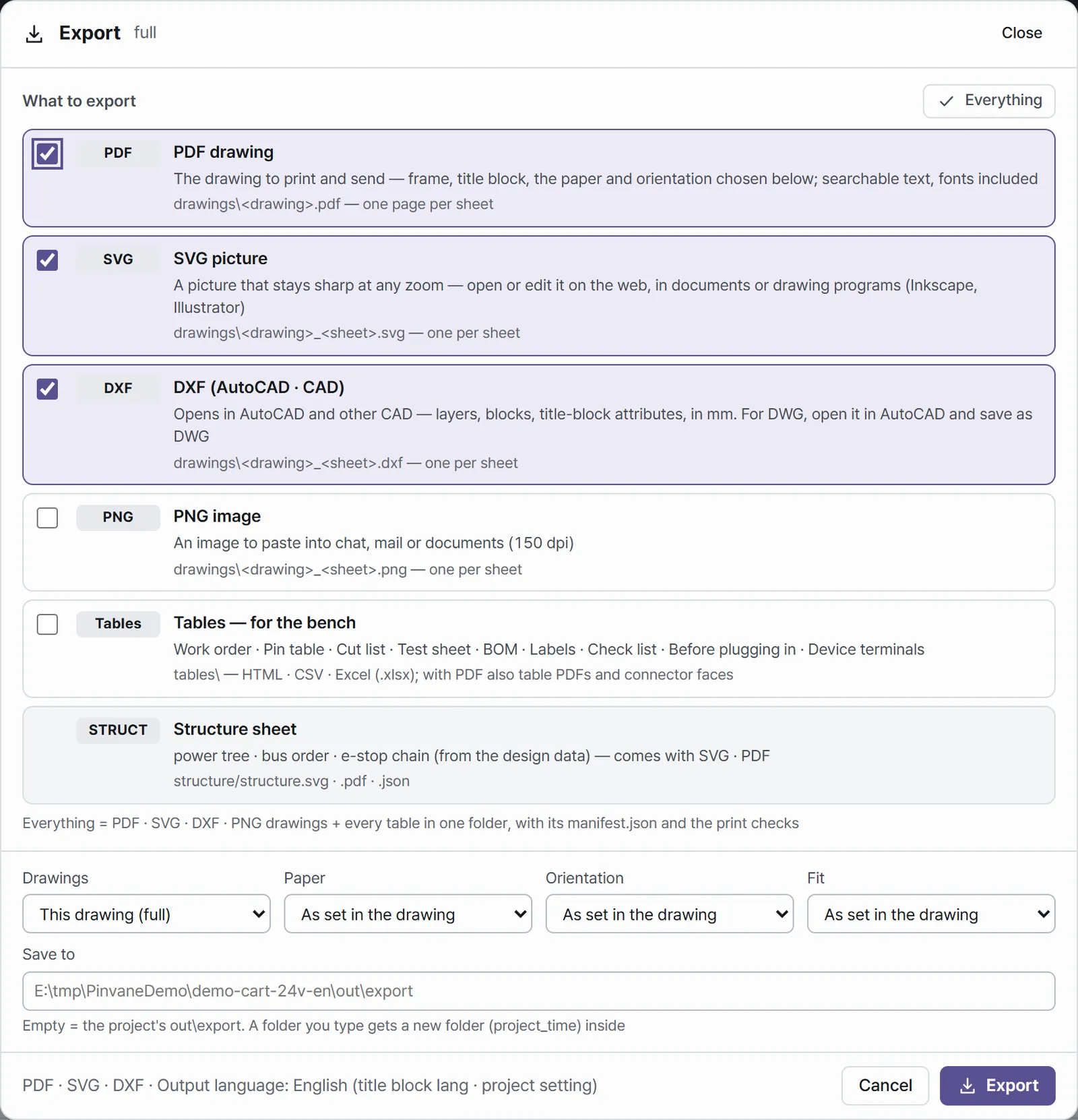
| Wiring diagram | PDF · SVG · PNG · DXF | Print (A4–A0, custom), CAD, sharing. Drawing frame with an editable title block. |
| Pin table · cut list | HTML · CSV · Excel · PDF | Cutting and crimping; rows show their evidence state and related check numbers. |
| Label list | HTML · CSV · Excel · PDF | Label text, count, gauge, colour and where each label goes. |
| Work order · pre-plug check · test sheet | HTML · CSV · Excel · PDF | The order of work, what to check before plugging in, how each test passes (test rows also show check numbers). |
| Check list · parts list | HTML · CSV · Excel · PDF | What is still undecided and who decides; what to buy. |
Table PDFs are made when PDF is selected. A table with nothing to list can be empty.
Drafts until people confirm them. Undecided production information — lengths, contacts, the real terminals — is confirmed and entered by you and your designer.E4